Camera settings handle the view; exposure, bloom, grain, and other effects alter how that view is presented.
A scene in Cronos: The New Dawn can be composed and then given a different visual treatment. Its photo mode provides adjustable camera settings alongside controls affecting brightness, contrast, and the texture of the resulting picture. Bloober Team’s description of camera settings.
Bloober Team lists exposure, contrast, and bloom among those controls. Film grain and color fringing provide further changes to the image’s appearance, with additional effects and stickers available. The subject may be a character or part of the game environment. Bloober Team’s detailed photo-mode controls and update notes.
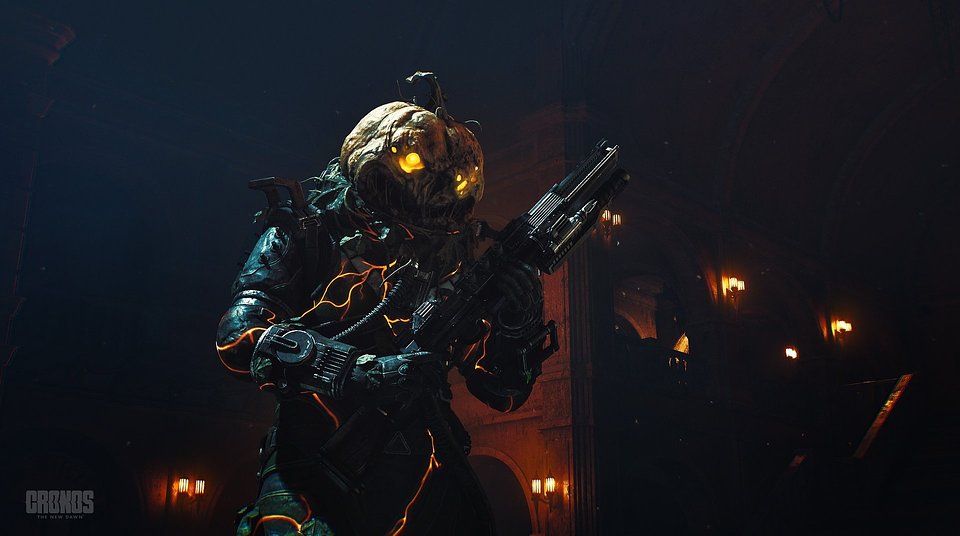
The Pumpkin Head skin adds another variable by changing the character’s appearance before the shot. The developer places that option in the game’s Extras menu. Its official promotional image shows the armored figure with a glowing, carved-looking pumpkin head.
Photo mode is included in a free update for owners of the game on PC and consoles. The same update contains cutscene-skipping options and HDR balancing adjustments, which are separate from composing a photograph. Bloober Team’s description of camera settings. Bloober Team’s detailed photo-mode controls and update notes.